
OFFICE GUIDE
Best Keyboard for Work
The short answer
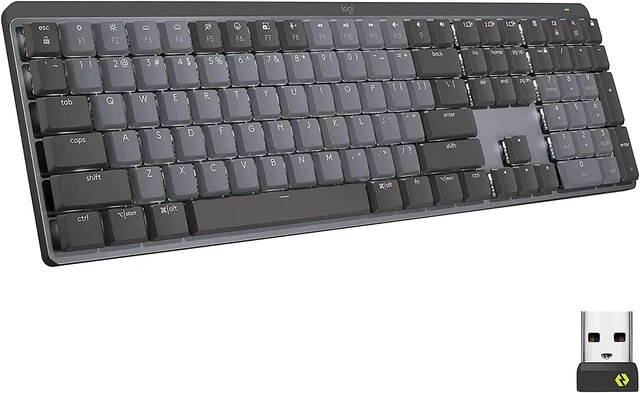
Get the Logitech MX Mechanical if you want a full-size wireless mechanical keyboard with your pick of tactile, clicky, or linear switches. Go with the ERGO K860 if you want a split ergonomic shape, the Keychron K3 if you need something slim for multiple devices, or the K845 if you want corded.
 Top pickLogitech MX Mechanical
Search on AmazonCompare prices on AmazonFind it on Amazon ↗
Some links here earn us a commission when you buy. It never decides what we pick. How we earn
Why we like it, the catch, and 4 more picks ↓ Jonathan LowryResearched October 21, 2026 · 5 picks · 5 sources
the best keyboard for work
Pick in five seconds
- If you want one wireless mechanical board for a full deskLogitech MX Mechanical
- If you type for long hours and want a gentler postureLogitech ERGO K860
- If you move between devices and want a slim keyboardKeychron K3
- If you want a matching keyboard and mouse togetherLogitech Signature Slim Combo MK955
- If you want a mechanical keyboard that stays cordedLogitech K845 Mechanical Illuminated
At a glance
| Pick | Best for | Skip it if | Where |
|---|---|---|---|
| Logitech MX MechanicalOUR PICK | This keyboard combines versatility and modern features for a comfortable work experience. | you prefer a corded model. | Amazon ↗ |
| Logitech ERGO K860ALSO GREAT | Ideal for users looking to improve typing posture and comfort over long hours. | you need a traditional straight keyboard layout. | Amazon ↗ |
| Keychron K3ALSO GREAT | Perfect for those who need a portable yet functional keyboard for various devices. | you don’t need wireless functionality. | Amazon ↗ |
| Logitech Signature Slim Combo MK955ALSO GREAT | Great for those who want a complete keyboard and mouse solution in a stylish package. | you are looking for just a keyboard without a mouse. | Amazon ↗ |
| Logitech K845 Mechanical IlluminatedALSO GREAT | Offers customizable typing options in a sleek design for dedicated users. | you are set on a wireless keyboard. | Amazon ↗ |
What we looked for
- Keyboard layout, because a split shape helps some hands and slows others
- Wired or wireless, because some desks need fewer cables and some need a cord
- Switch style, because tactile, clicky, and linear feel different all day
- Slim or full-size build, because portability and desk feel pull in opposite directions
- Multi-device support, because some work jumps between more than one machine
- Operating system compatibility and return policy, because setup and fit can be personal
01 / OUR PICK
Logitech MX Mechanical
Full size with your switch choice
At 9 on a Monday, when you want one keyboard to cover writing, spreadsheets, and the rest of the week, the Logitech MX Mechanical makes the strongest general case. It is wireless, mechanical, and full size, so it suits a work desk without pushing you into the split shape of the ERGO K860 or the slimmer build of the Keychron K3. The switch choice matters too. Tactile, clicky, or linear lets you pick the typing feel you want instead of taking whatever shows up. Smart illumination adds one more modern touch. If you prefer a corded model, the Logitech K845 is the better fit.
Why we like it This keyboard combines versatility and modern features for a comfortable work experience.
Skip it if you prefer a corded model.
- Features tactile and linear switches as per user preference. per the maker
02 / ALSO GREAT
Logitech ERGO K860
Split shape for longer typing sessions
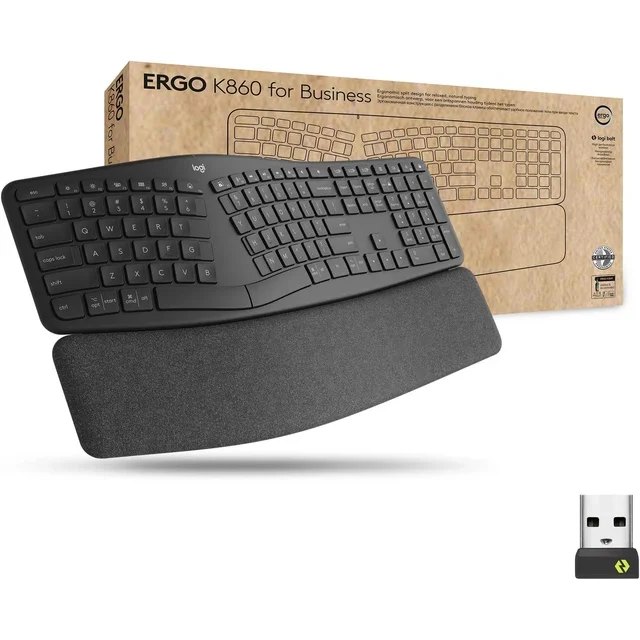
Long afternoons are where the Logitech ERGO K860 earns its place. The split design and cushioned palm rest are there to promote a natural typing posture, which is the main reason to choose it over the Logitech MX Mechanical or the Logitech K845 if comfort across long hours matters most. It is wireless too, so you keep the cleaner desk that the other wireless picks offer while getting a shape built around posture. This layout asks you to want that shape, though. If you need a traditional straight keyboard layout, this one will feel wrong from the start.
Why we like it Ideal for users looking to improve typing posture and comfort over long hours.
Skip it if you need a traditional straight keyboard layout.
- Promotes a natural typing posture with a split design. per the maker
03 / ALSO GREAT
Keychron K3
Slim and ready for several devices
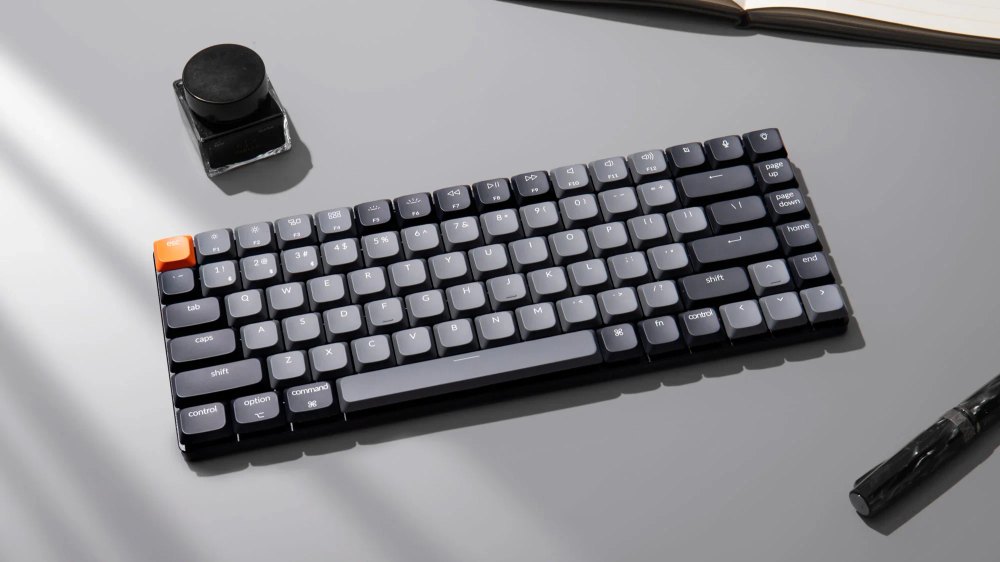
Some work follows you from desk to desk, and the Keychron K3 fits that kind of day. Its slim build and low-profile switches lean into portability, while wireless support and compatibility with multiple devices make it the easier pick than the Logitech MX Mechanical if you move between machines. Compared with the ERGO K860, it gives up the split ergonomic shape and cushioned palm rest, but it asks for less space and is aimed more at moving around. It is not the right buy just for the sake of it. If you do not need wireless functionality, the Logitech K845 makes more sense.
Why we like it Perfect for those who need a portable yet functional keyboard for various devices.
Skip it if you don’t need wireless functionality.
- Low-profile design enhances portability and versatility. per the store
04 / ALSO GREAT
Logitech Signature Slim Combo MK955
A matching desk setup in one combo
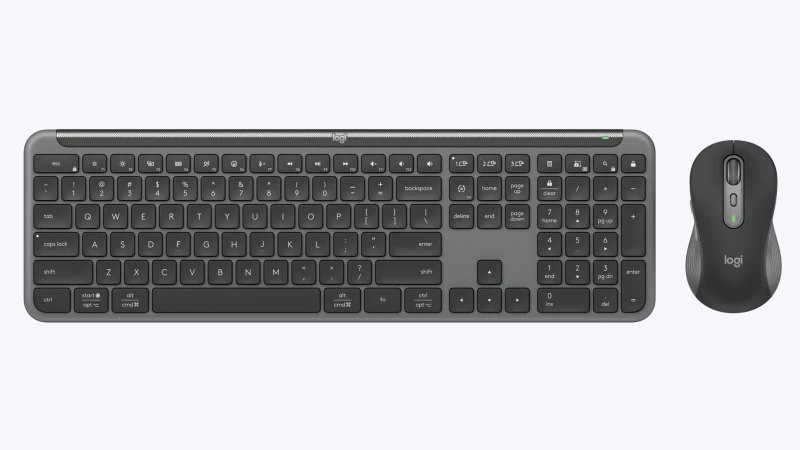
On a desk that still needs a mouse, the Logitech Signature Slim Combo MK955 handles both jobs at once. You get a wireless keyboard and mouse together, plus a slim profile, low-profile keys, and multi-device switching aimed at productivity. That makes it a more complete setup than the Logitech MX Mechanical or the Keychron K3 if you want one matching package instead of building your own mix. It is less focused if your shopping list stops at the keyboard itself. If you are looking for just a keyboard without a mouse, this combo gives you something extra you did not ask for.
Why we like it Great for those who want a complete keyboard and mouse solution in a stylish package.
Skip it if you are looking for just a keyboard without a mouse.
- Combines keyboard and mouse in a single stylish combo for ease of use. per the maker
05 / ALSO GREAT
Logitech K845 Mechanical Illuminated
Corded mechanical feel for a fixed desk
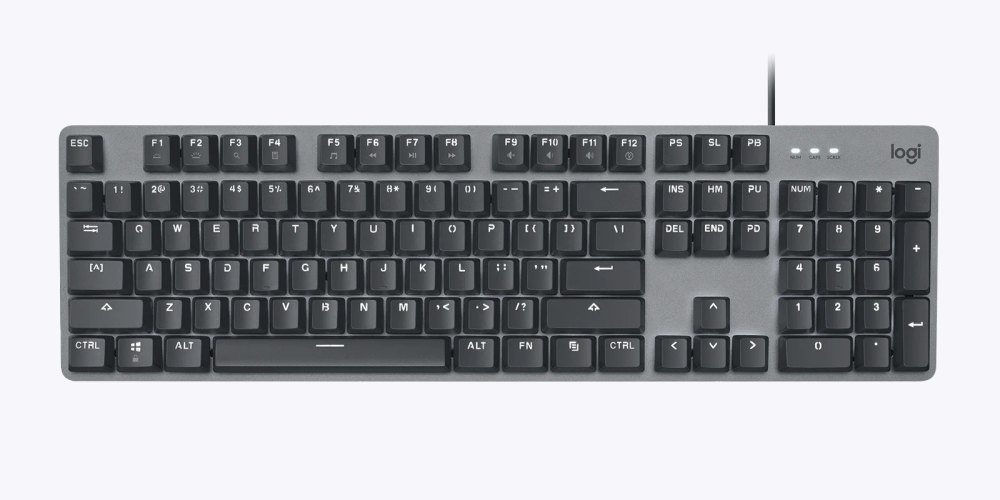
When you want to plug in and stay put, the Logitech K845 Mechanical Illuminated is the clear corded choice here. It keeps the mechanical feel and switch choice that make the Logitech MX Mechanical appealing, but trades wireless for a direct cable connection. The modern aluminum design gives it a more dedicated desk look than the more portable Keychron K3, and the adjustable tilt lets you set the angle for comfort. This one is not for people trying to keep cables off the desk. If you are set on a wireless keyboard, go back to the MX Mechanical or ERGO K860.
Why we like it Offers customizable typing options in a sleek design for dedicated users.
Skip it if you are set on a wireless keyboard.
- Features modern design and adjustable tilt for comfort. per the maker
OUR CALL
Which one we would buy
Logitech MX Mechanical wins because it covers the most work setups in one keyboard. You get a full-size wireless mechanical board with your choice of tactile, clicky, or linear switches, so it fits more desks and typing preferences than the others without steering you into a very specific shape. We would take the Logitech ERGO K860 for posture and long typing hours, the Keychron K3 for a slim board that works across multiple devices, the Logitech Signature Slim Combo MK955 when you want the mouse included, and the Logitech K845 Mechanical Illuminated if a cord is the whole point. You already know your desk.
ONE MORE THING
Before you buy
Ensure compatibility with your operating system and check return policies.
GOOD TO KNOW
Quick questions
Which one should I start with?
Start with the Logitech MX Mechanical for a premium typing experience. The others are great for specific needs like ergonomics or portability.
MAKE IT PERSONAL
Shopping for something a little different?
Tell the concierge your budget, who it's for and what you already own, and it will put together a shortlist just for you.
“the best keyboard for work”
Find my options ↗Can't find it here?
Ask. We research it tonight and email you the guide in the morning.
Sources
- logitech.com
Accessed October 21, 2026
- futureisnow.logitech.com
Accessed October 21, 2026
- amazon.com
Accessed October 21, 2026
- logitech.com
Accessed October 21, 2026
- logitech.com
Accessed October 21, 2026
We chose the picks from these sources, and the guide went live after automatic checks that every line makes sense and is safe to publish. Nothing here is paid placement, and commissions never decide what we pick. How we choose.
KEEP GOING